
IT Tips & Tricks
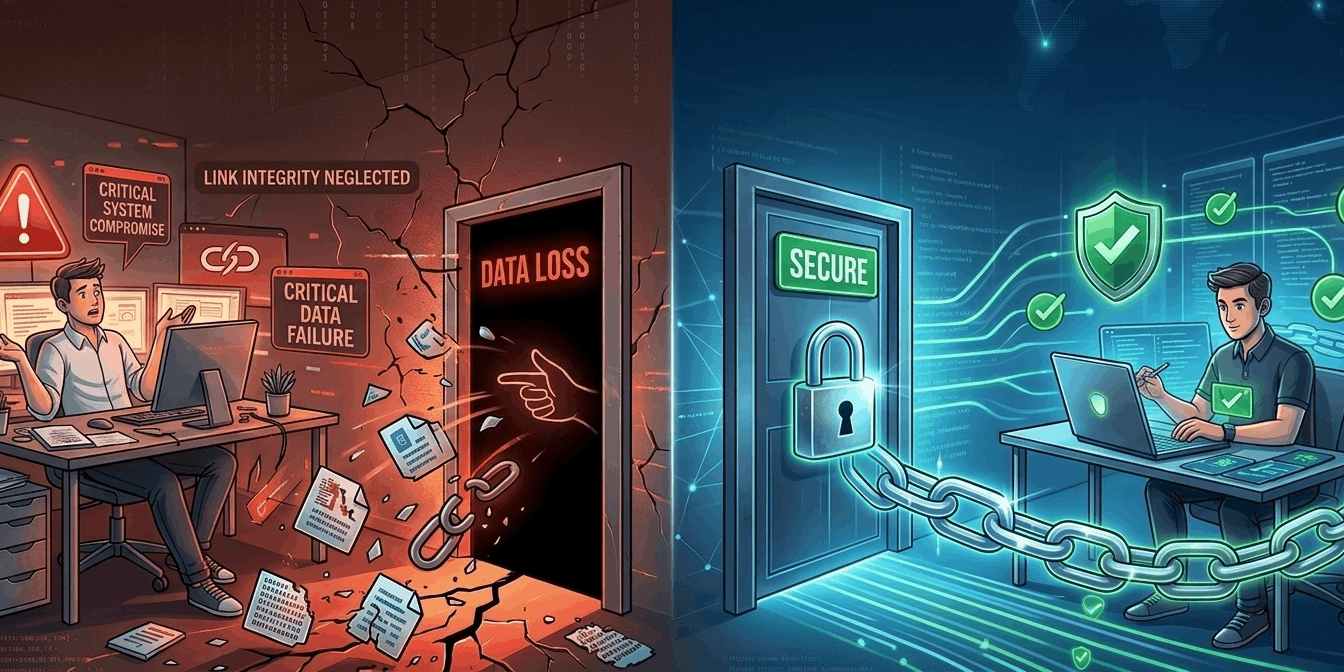
If You’re Not Proactively Preventing Link-Related Data Loss, You’re Inviting It
Published 10 March 2026
In IT, some problems make themselves known immediately. A server goes down. Storage hits capacity. An alert fires at 2 a.m. (Why is it always at 2 a.m?)
Broken links are different.
Most IT departments don’t actively ignore them. They simply don’t think about them. Not because they’re unimportant, but because links tend to work quietly in the background … right up until the day they don’t.
And by then, the damage is done. That’s why it’s worth saying out loud:
If you’re not proactively preventing link-related data loss, you’re inviting it.
Links tend to work quietly in the background … right up until the day they don’t.
The Problem No One Plans For (Until They Have To)
Links are everywhere. Documents reference other documents. Spreadsheets point to shared folders. Presentations pull in files from data created years ago by people who have long since moved on. Yet in most migration projects, the topic of broken links often doesn’t appear on the risk register.
Why? Because link-related data loss isn’t as visible as other problems, at least not during the planning phase. For too many IT departments, everything looks fine until a migration completes or a restructure finishes, and suddenly, users discover that their important links lead absolutely nowhere. At that point, link integrity becomes very important. But it’s just a little too late. Now the work for the IT department gets even more serious.

Links are everywhere, yet largely overlooked due to their lack of visibility.
Obviously, ignoring link-related data loss doesn’t make it go away. It simply makes it inevitable (and more damaging).
The Silent Cost of “We Didn’t Know”
When links break, the impact isn’t always immediately dramatic. There are no flashing red warning lights, no emergency sirens and no system lockdown. (All that comes later.) What the impact is, however, is persistent.
If you’re moving data without protecting links, you’re literally building the problem into the project.
- Users waste endless hours searching for missing files.
- Confidence wanes in systems that “used to work.”
- Unnecessary duplicate content is created as users attempt to rebuild what they can’t find.
- Help desk tickets that are hard to diagnose and harder to close overwhelm the IT department.
- Downtime potentially impacts revenue.
And this is where the real lesson emerges: If you’re not intentionally planning for link integrity, you’re unintentionally planning for data loss.
Sometimes, it’s the slow, productivity- and revenue-draining kind of loss that spreads surreptitiously through an organization. And sometimes, it’s utterly, ruinously catastrophic.
Data Migrations Get the Blame, While the Real Cause is…
Ironically, many data migrations are initially seemingly successful. The data arrives in the new location. The folders are there. Permissions are correct. But the key is in the word seemingly. In most cases, the links, by default, still point to the old location, which leads to a realization many teams only reach after the fact:
If you’re moving data without protecting links, you’re literally building the problem into the project. At that point, broken links aren’t an accident. They’re a predictable (yet avoidable) outcome.
So, the actual cause of the problem is not the migration itself, because the fact that links will break is inherent. The real cause is failing to plan for handling links, pre-migration.
Making Link Integrity Part of the Plan
This is where LinkFixer Advanced changes the conversation.
Instead of treating broken links as an unavoidable clean-up task, LinkFixer Advanced allows IT teams to:

Don’t want to deal with the service tickets? Don’t let the links break!
- Protect links before data moves.
- Automatically repair links after migrations.
- Preserve access to information users rely on every day.
In other words, it addresses the problem most teams don’t realize they have … until it hits them out of left field.
Once you’ve dealt with link-related data loss the hard way, it’s a problem you don’t easily forget.
A Calmer Way to Run IT Projects
When link integrity is handled proactively:
- Users don’t lose trust in the system or their tools.
- Support teams aren’t buried in “missing file” tickets.
- Migrations complete, cleaner and faster.
- IT avoids inheriting problems that never needed to exist.
Less downtime,
less data loss,
less complaints.
It’s a classic case of “less is more.”
Preventing broken links doesn’t make a migration project more complicated. It makes it smoother and easier. Less downtime, less data loss, less complaints. It’s a classic case of “less is more.”
Final Thought
Most IT teams don’t intentionally set out to ignore broken links. They simply don’t notice them until the day that they become impossible to miss.
That’s why proactive prevention matters. If you’re not proactively preventing link-related data loss, you’re practically sending it a handwritten invitation.
In IT, the best problems to have are the ones that let you leave the office on time … with no grouchy bosses, data loss or service tickets hanging over your head all weekend.
For more info, call 727-442-1822 or chat with us online at LinkTek.com. Need help with a SharePoint migration? Schedule a free strategy session.

LinkTek COO
Ed Clark

Feel free to share this article on your social media:
Recent Comments
- No recent comments available.


 ChatGPT,
 Gemini,
 Claude and
 Copilot
Leave a Comment