

IT Tips & Tricks
How Many Apps Does It Take to Finish One Task?
Published 17 November 2026
You’ve approved the purchase request in your project tracker. Then you get a message: “Thanks! Can you also confirm by email so I can update the spreadsheet?”
Somewhere in your IT budget, the organization is paying for all these steps.
Let’s say the sales department needs a new laptop. The request goes into the service portal. The supplier’s quote lives in a shared folder, the budget sits in Excel and the discussion happens in Teams. The manager approves it by email because that’s where the notification found him.
You’ll learn more from watching them find the approved quote (or whatever they’re attempting to do) than from asking whether the company has an “efficient digital workflow.”
Now someone has to gather up all that data and turn it into an order.
It’s a simple laptop purchase. Somehow, it’s turned into a major production.
Nobody Wants the Obstacle Course
If you’re the IT manager, you can probably explain how every app has earned its place in the organization.
Everyone has handled their bit of the process and moved on. But someone still has to corral those bits of data and work out whether the laptop can actually be ordered.
In this instance, finance needs its workbook. The service desk needs a ticket. The sales department just wants to know when the laptop will arrive, preferably before the new employee starts on Monday.
Those are reasonable requirements. But workflow efficiency suffers when someone has to keep carrying the same information back and forth between parties and apps. Back and forth isn’t efficient.
Someone copies the ticket number into the spreadsheet. Someone else downloads the quote and attaches it to an email because the approver can’t open the shared folder. The approval comes back, but purchasing doesn’t see it because purchasing wasn’t on that thread.
Fortunately, there’s Carol.
Carol knows which spreadsheet is current and whose approval actually counts. New employees soon learn that the documented procedure works much better if you simply ask Carol first.
Poor Carol would quite like to take a vacation.
For IT managers and MSPs, this is easy to miss during a software review. Your inventory can tell you who owns an app and when its contract renews, but it probably doesn’t have a column for “Carol spends Friday afternoon making these systems agree.”
Ask Someone to Show You the Whole Thing
Before cancelling licenses or shopping for yet another integration, pick a task that regularly irritates employees. Ask an employee who frequently deals with it to walk you through a completed example.
You’ll learn more from watching them find the approved quote (or whatever they’re attempting to do) than from asking whether the company has an “efficient digital workflow.”
Follow the detours. When they say, “Normally I just message Carol,” find out what Carol does next. Does she supply missing information? Find a document? Explain why “approved” in one system doesn’t mean purchasing can place the order in another?
That last one is a potential red flag. If the service portal records approval but purchasing requires an email, connecting apps might not resolve the disconnect. Someone has to decide which record gives purchasing the green light.

When the apps don’t pass information along, Carol does.
As you follow the request, count how often someone manually carries the same information into another system or app. That tally is a useful starting measure because you can count it again after making changes.
Also separate actual work from waiting. A request that takes three days might involve twenty minutes of effort now, followed by a long wait for a manager to respond. Removing five clicks along the way won’t help much if the approval is still sitting unread in his inbox.
For an MSP, walking through a troublesome task can also help create a better client conversation than simply presenting a list of subscriptions to cancel. The client gets to show you what’s driving them nuts. Now you’ve got the details of a specific problem you can solve, which will make the client happy.
The App Count Won’t Tell You Everything
Research into app switching offers some clues about why work can feel so fragmented, although it doesn’t produce a magic number of applications everyone should use.
A July 2026 preprint by Sumer S. Vaid and Ashley V. Whillans examined 103 million app events from 1,017 employees across eight organizations. App-switching patterns varied more between different workdays for the same employee than they did between employees or organizations.
Simply counting files won’t catch the problem. Your files can all arrive while the links inside them still point to locations you’ve retired.
That suggests it’s worth looking at what happens on a particularly scattered weekday. The same employee, using the same approved apps, may have a very different experience depending on what the day demands.
Atlassian’s State of Teams 2026 report found that 87% of the professionals surveyed said everyone was so busy doing their own work that they didn’t have enough time to coordinate with colleagues.
You can see how that plays out in our hypothetical laptop purchase. Everyone has handled their bit of the process and moved on. But someone still has to corral those bits of data and work out whether the laptop can actually be ordered.
Give the Spreadsheet a Chance to Retire
Some fixes may be pleasantly small. If a tracker only repeats information already available in the service portal, find out why people still need the tracker. Perhaps purchasing can’t access the portal, or the portal’s purchase-request report doesn’t show whether a request has been approved. Giving purchasing access or adding the approval status to the report might let you retire the tracker without launching a six-month transformation program.
Where you automate a step, decide who gets told if it fails. Otherwise, people may keep checking multiple apps manually, just to be safe. In that case, you’ve just paid for an integration while retaining the work it was meant to remove.
Test an awkward purchase too. The standard laptop request may sail through while an expensive workstation needs approval from another manager. If that scenario sends half the people involved in the purchase process back to email, you’re back to square one.
Application consolidation can help, as can bringing scattered files into one location. Before you move those files, though, there’s something else to check. And this one’s important if you want things to work as efficiently as you intend.
The Files May Have Their Own Connections
Imagine you’ve moved the purchasing workbook and its separate price file into a new central location. Both arrived and the data migration report looked reassuring, so you closed the old share.
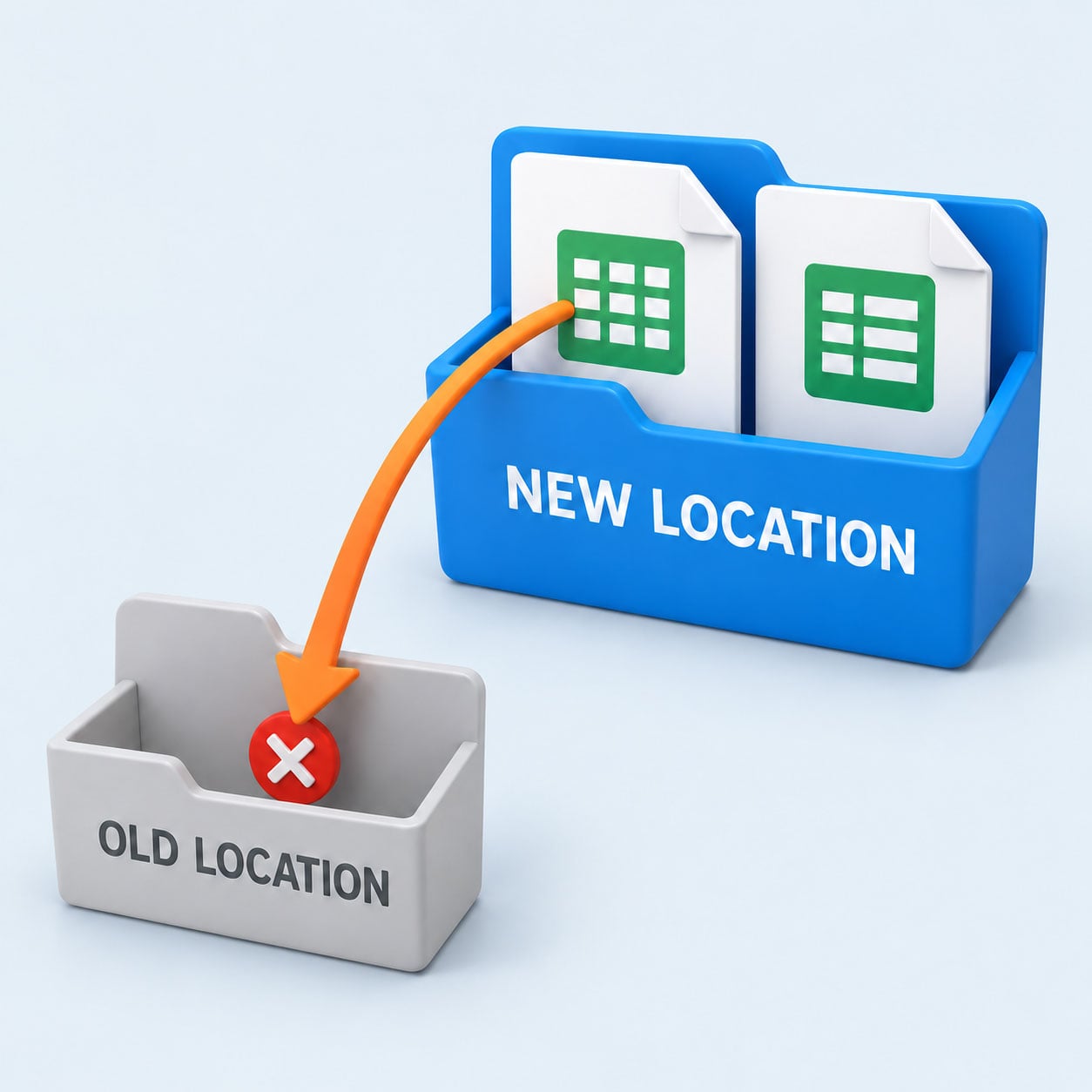
Both files made the move, but the link still points to the old address.
Then someone opens the purchasing workbook, but it’s still looking for the price file on the old share.
That’s when you discover that your “simpler” process has just necessitated a broken-link investigation before that laptop can be ordered.
That’s a genuinely frustrating result when the whole purpose of the project was to save people time. Simply counting files won’t catch the problem. Your files can all arrive while the links inside them still point to locations you’ve retired.
This is where LinkFixer Advanced™ has a practical role. Its three different reports can help you investigate connections within supported files before changing their locations.
For our purchasing example, that gives you a way to investigate which workbooks depend on the price file before moving it. LinkFixer Advanced can also pre-protect working file links before migration and repair broken links in supported environments. Check the relevant file types and link types when planning the work.
Include those links in the cleanup alongside the application changes. The person ordering the laptop shouldn’t have to try and track down a price file on a share that’s been retired.
Try Ordering the Laptop
Before declaring victory, have someone run the revised process using an ordinary user account.
Can they open the quote? Does purchasing receive an approval it can act on? If you’ve moved linked files, also check that those connections still work. (Tip: Have LinkFixer Advanced do this for you.)
Then compare the number of manual steps taken with your original count. You’ll have something more useful than merely a smaller collection of app icons. You’ll have evidence that you’ve removed unnecessary work from a task people actually perform.
Keep that example handy for the next software proposal. Ask whoever’s demonstrating the product to show which step (or steps) it would eliminate.
And this time, let Carol watch.
By Ed Clark

LinkTek COO
Ed Clark

Feel free to share this article on your social media:
Recent Comments
- No recent comments available.


 ChatGPT,
 Gemini,
 Claude and
 Copilot

Leave a Comment