
IT Tips & Tricks
Data Repatriation: Why Some Cloud Users Are Bringing Data Home
Published 7 January 2026
What has been the most celebrated, most lucrative party in the history of enterprise technology? The cloud.
For two decades, the mantra has been simple, thrilling and endlessly funded: “Move fast. Break things. Go to the cloud.” Chief Information Officers (CIOs) were showered with digital confetti, venture capitalists toasted the death of the on-prem data center, and every IT professional was categorically told that their future lay in the ethereal pay-as-you-go paradise of the hyperscalers such as AWS®, Azure® and Google Cloud®.
The world watched the lift-and-shift frenzy with a mix of awe and dread. It was a gold rush that elevated many a humble in-house data center manager to a digital prospector, with promises of scalability, elasticity and the glorious reduction of CapEx (capital expenditure) headaches related to servers, storage arrays, network switches, routers, firewalls and other IT infrastructure expenses.
It’s the inevitable, painful collision of dreamy tech ambition with cold, hard financial reality.
The plan was intoxicatingly simple: Buy computing resources like you buy electricity — paying only for what you use — from an independent provider. The cloud promised to be better, because, for the user, this electricity (the cloud) also offered serverless functions, machine learning and automatic infrastructure-as-code deployment.
So, we hurtled into the public cloud at warp speed. Now, twenty years later, we’re starting to see some companies pump the brakes as they’re faced with a new predicament. What is this predicament? How did it come about? What’s the best solution? These are the topics of this article.
Are We Witnessing the Beginning of the End of the Cloud Honeymoon?

If your cloud costs are enough to blow your hair back, it’s time to consider your options.
While it’s too soon to answer this question broadly, for some organizations, the party is fizzling out. They find themselves squinting at their colossal bill from their public cloud provider, feeling like the bliss has become blisters.
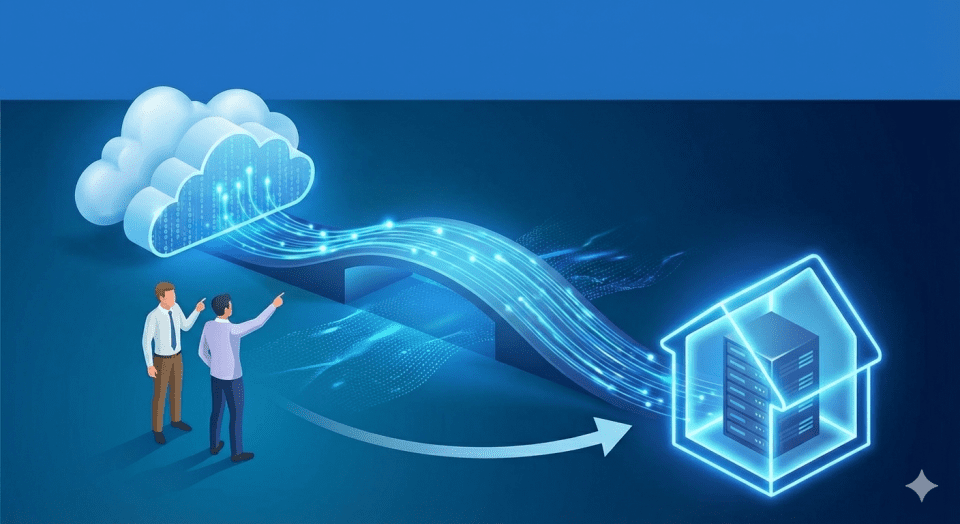
Today, one of the hottest trending conversations in IT and data migration is what some are calling the “Great Repatriation”. “Repatriation” typically refers to someone returning from living abroad back to their country of origin. But in IT, when talking about the cloud, “repatriation” means moving applications, data and workloads back from public cloud providers to on-prem data centers, private clouds or other controlled environments.
I will quickly add that the current trend is not a mass exodus from the cloud. A more accurate characterization would be that it’s a period of adjustment in which many organizations are re-evaluating their cloud strategies and moving some of their data from a public cloud to the above-mentioned alternatives.
Some organizations are finding that for a significant portion of their mission-critical workloads, the cloud is simply too damn expensive. Many are now migrating back — usually not to the outdated on-prem data centers of yore, but to highly optimized, next-generation private and hybrid environments.
Reported Repatriation Numbers
A Barclays study found that more than four out of five enterprises (about 83%) intend to shift at least part of their workloads away from public cloud environments and back into privately controlled infrastructure.
Similar trends have been observed by global market intelligence firm, IDC, which notes that a significant majority of organizations (roughly 70–80%) move some portion of their data back in-house each year.
Analysis from Silicon Valley venture capital firm, Andreessen Horowitz, points out that public cloud expenses can have a dramatic impact on software companies, in some cases cutting gross margins by half. According to the report, relocating certain workloads to owned infrastructure can substantially boost profitability and even lead to a doubling of a company’s valuation.
It’s the digital equivalent of leaving the lights on in 100 empty offices.
Despite ongoing public cloud growth (which, as of now, is showing no signs of flattening), the Flexera State of the Cloud Report shows that many organizations are recalibrating their strategies. About 42% of workloads are being shifted from public cloud platforms to private clouds or on-premises systems as businesses seek better cost efficiency.
Another well-known example comes from 37signals — the team behind the web-based project management and team communication platform, Basecamp — which reported saving $7 million over five years after moving off the public cloud and returning to hardware they manage themselves. Their experience has inspired numerous SaaS companies to reconsider how much they rely on public cloud services.
The cloud promised elasticity and savings. For many, what it delivered is complexity and, financially, a runaway train.
It’s important to understand that this isn’t a failure of the cloud itself. It’s the inevitable, painful collision of dreamy tech ambition with cold, hard financial reality. It’s a collective story of architectural mishaps, sticker shock and the rise of the ultimate power player in IT, the FinOps warrior.
You’ve probably heard or read about FinOps, but you may be wondering exactly what it is. FinOps is literally Finance + DevOps. It’s a shift from simply controlling business costs to making informed spending choices that align technology use (such as cloud expenditure) with strategic business goals. That may not sound like your cup of tea, but someone’s gotta do it.
Before we continue, I’d like to clarify something else — the difference between hybrid cloud and multi-cloud environments — since you’ll see them referenced in this article.
A hybrid cloud typically describes one of two things: (1) a setup that integrates public cloud services from a cloud provider with an organization’s own on-premises infrastructure, or (2) a blend of public cloud offerings and privately managed cloud services designed for individual clients.
Multi-cloud refers to the use of several public cloud platforms, often sourced from different providers.
When a multi-cloud setup is integrated with an on-premises data center, it becomes known as a hybrid multi-cloud environment.
Now, let’s get into the nuts and bolts of the repatriation trend.
Part I: How “Lift-and-Shift” Created Cloud Ghettos
To understand the current situation, we have to rewind to the first wave of migration to the public cloud, which started around 2005, roughly.
Back then, the pressure to achieve “Cloud Nirvana” was intense. The fastest way to get there was often “lift-and-shift”: taking an application and its associated data — often built for a static, private data center — and plopping it directly onto a virtual machine in a public cloud. It was the architectural equivalent of wearing a tuxedo to a barn dance: technically correct (at least you’re not naked), but contextually unsuitable (and in some cases disastrous).
Think of high egress fees as something like the “Hotel California” of the cloud world.
The rationale was speed. Get the assets into the cloud immediately and then re-architect them into “cloud-native” microservices later.
Spoiler alert: “Later” never came.
What often happened instead was the creation of cloud ghettos. Enterprises ended up paying premium, flexible, elastic, pay-per-second cloud rates for applications that were inherently inflexible, underutilized and designed to run 24/7 on dedicated, in-house hardware. Moving such applications to a pay-per-use model is one of the fastest ways to cause soaring operational expenses.

Many thought the cloud would be simpler than it turned out to be.
Fast forward twenty years and here we are, in the reckoning phase. That initial rush to the cloud may have made the CIO look good in Q4 back then, but it has left the IT manager with a portfolio of services that are constantly over-provisioned, yet under-utilized.
For most organizations, the reality check hits when Chief Financial Officers (CFOs), armed with astronomical billing reports, realize the extent to which they are:
- Paying for Underutilized Computing. Buying a massive virtual server that only spikes for two hours a day, but running it 24/7 because no one set up the auto-scaling correctly? Ouch.
- Paying for Input/Output and Network Traffic. The unexpected “surprise” on every bill? The egress fee. Moving data out of the public cloud (for backup, analytics or connecting services) incurs a massive financial penalty that effectively traps data like a financial hostage. Big ouch.
- Paying for Sprawl. The ease of spinning up a new development environment means that no one ever bothers to “spin it down”. It’s the digital equivalent of leaving the lights on in 100 empty offices. Ongoing ouch.
This isn’t just costly. It’s unforgivable from a business efficiency standpoint. The cloud promised elasticity and savings. For many, what it delivered is complexity and, financially, a runaway train.
Part II: Why Finance Is Invading IT
This is where the story gets somewhat strange. The ultimate judge of the migration strategy is no longer the IT engineer or manager. It’s the finance people. The hottest new trend isn’t a programming language or a database. It’s FinOps.
The rise of FinOps is a direct consequence of cloud costs draining company coffers. Currently, the goal of FinOps is to bring financial accountability, governance and cost optimization practices to an organization’s wildly variable spending on the cloud.
The FinOps team is the new investigative squad, peering into the shadowy corners of cloud spending where engineers once reigned supreme. But what are they exposing?
The FinOps Hit List: The Secret Cost Drivers
- Egress Fee Extortion? That may be an overstatement. But this is the most questionable part of the monthly bill. At an estimated $0.001 to $0.005 per gigabyte, it costs virtually nothing for a cloud provider to send your data back to you, yet they charge high (in some cases, relatively exorbitant) egress rates — sometimes more than the data storage itself. The cost of operational egress (more on this below) has become the single biggest driver for repatriation.
Think of high egress fees as something like the “Hotel California” of the cloud world. You can check in, but you can never leave (unless you’re willing to pay the big bucks).
The problem is twofold. One, egress fees are high. Two, the monthly bill is completely unpredictable, which makes budgeting highly problematic.
Egress charges depend on several variables, including the number of users accessing a file and their geographical location. Data moving between regions (or even zones within the same region) costs more.
The cost of manually fixing thousands or even millions of links turns the triumphant return home into a midnight emergency. Fortunately, there is a solution for this.
So, how much are we really talking about? Take the example of a video production team that hosts one petabyte of raw footage in a standard public cloud. They need to move it to a different provider for specialized AI processing. The egress fees? They could face an exit bill of $90,000 to $120,000 just for that one data transfer.
For most organizations, the problem is that once you have a massive amount of data in one place, the cost to move it becomes so prohibitive that you are essentially “locked in.” Even if a competitor offers a 20% lower storage rate or a superior AI tool, the upfront “exit tax” to move your data to them often outweighs the long-term savings of switching.
In Europe, the EU Data Act has mandated that cloud providers allow customers to switch providers more easily. In response, AWS, Google and Azure began waiving egress fees — but only for permanent migrations. In other words, these waivers usually require you to close your account or delete your data after moving. They don’t solve the problem of operational egress — the daily cost of using your data.
So, what type of data should stay in the public cloud and what should be repatriated?
| Keep in Public Cloud | Repatriate to Private Cloud or On-Prem |
| Variable Workloads: Apps with massive spikes (such as e-commerce on Black Friday) where you need “burst” capacity. | Steady-State Workloads: Core databases and backend services with 24/7 predictable resource consumption. |
| Disaster Recovery (DR): It is cheaper to pay for storage “at rest” in a secondary region than to build a physical secondary data center. | High-Egress Workloads: Data-intensive apps (such as video processing, large-scale telemetry) that constantly move data to users or other systems. |
| Experimental AI/Machine Learning: Projects requiring the latest H100/B200 GPUs for short-term bursts or R&D. | GenAI Inference & Training: Once a model is stable, the 2,000% markup on cloud GPU/networking becomes a massive margin drag. |
| Global Reach: Front-end applications that need to be physically close to a global user base. | Sovereignty & Compliance: Data subject to strict local laws (such as GDPR) where physical control of the hardware is an audit requirement. |
- The Zombie Infrastructure: FinOps hunts down the infrastructure that is alive but serves no purpose — the forgotten VMs, test environments left running, the abandoned data lakes and the old load balancers that someone forgot to decommission.
- The License Lock-in Loophole: When companies lifted-and-shifted proprietary software with complex licensing (like Oracle or Windows Server) to the cloud, they often found their licenses weren’t portable, forcing them to buy new, expensive cloud-specific licenses on top of the original cloud infrastructure costs.
The core realization is that the public cloud is only cost-effective if you are 100% cloud-native, auto-scaling and utilizing resources perfectly.
For large, static or complex enterprise workloads such as Enterprise Resource Planning systems, large file repositories or specific databases, the old-school, paid-off dedicated hardware model — managed smartly — was often cheaper.
The value proposition of the cloud has shifted from “where to run everything” to “where to run only the things that unequivocally require elasticity.”
The CFO, once the migration project’s biggest cheerleader, is now its most rigorous critic, demanding to know why the organization is paying a 300% premium for a static workload. And it’s a legit question.
Part III: The New Migration — The Route Back Home
I can’t speak for other IT pundits, but I don’t see this “cloud repatriation” as merely dusting off the old equipment in the server room (though I’m sure some amount of this is occurring, too). I’m primarily talking about a highly strategic, second-wave migration that creates a sophisticated hybrid ecosystem.
This new architecture is not limited to on-prem, although on-prem could form one component of the hybrid structure. Instead, I’m talking about including a private cloud option that can mimic the functionality of the public cloud, using hyperconverged infrastructure (HCI) and cloud-native orchestration tools.
The New IT Mandate: Smart Workload Placement
The decision-making process addresses three potential components.
- Move Back (Repatriate): Large, stable, high-input/output or compliance-heavy workloads that run 24/7 (core financial systems, ERP backends, massive file shares) should be moved to a private These are the systems where the company is paying a high, hourly, variable operational expense (OpEx) for stability they could secure more cheaply through ownership.
The strategic decision is to stop paying the high Public Cloud OpEx and, instead, make a capital expenditure (CapEx) — a planned, one-time investment — to build or upgrade a private cloud environment. This reintroduction of manageable CapEx, combined with lower, predictable OpEx for power and cooling, dramatically reduces the Total Cost of Ownership (TCO) for these specific, stable workloads. This shift maximizes efficiency by placing workloads where the underlying economics make the most sense.

When the finance team takes over the decision-making for the IT department, it’s time to reevaluate your current cloud situation and the associated costs.
- Move Out (Multi-Cloud): The goal here is to use the best tool for the job. This approach is driven by the need for specialized, proprietary services that offer a competitive edge, or by deliberate vendor diversification to reduce risk. Instead of housing the entire application portfolio in one provider, organizations place specific workloads where they can achieve unique benefits. For example:
- Proprietary Services: A company might keep its massive data processing pipeline on Google Cloud’s BigQuery because its unique architecture allows for incredibly fast, petabyte-scale analytics that other cloud services cannot match.
- Niche Integration: An e-commerce platform might keep its core ordering system on AWS due to deep integration with a specialized third-party logistics software service that is only hosted there.
This multi-cloud strategy is not about redundancy. It’s about strategic workload placement, ensuring that high-value business functions benefit directly from the unique tools of a specific cloud provider.
To simplify, think of it like this: If you were designing your own home, you know that you need a bed, a toilet and an oven, right? But you wouldn’t necessarily put all three in the same room (I hope)! Each has its rightful place — just not in the same place.
It’s the tool that can make the difference between a migration that signals the triumphant return of the data, or a high-profile, data-busting failure.
- Keep In (Optimize): Highly variable workloads that truly benefit from elasticity (e-commerce peak seasons, dev/test environments, new AI model training) could stay in the public cloud and be rigorously managed by FinOps.
Repatriation is arguably more complex than the original migration to the cloud. It involves the painstaking process of decoupling applications from the specific cloud services that organizations relied on (proprietary identity services or storage APIs). The workloads must then be moved back to infrastructure that can be run on-premises or across multiple cloud environments. This decoupling is the heavy lift of repatriation, as it reverses the lock-in often encouraged during the initial move to the cloud.
Repatriation does, however, come with some distinct benefits.
The Benefits of Cloud Repatriation
- Cost Optimization: Reduced public cloud fees, often due to better resource utilization and avoiding unexpected scaling/data transfer costs.
- Performance Improvement: Lower latency and faster access for specific, critical applications by locating them closer to end-users or other on-premises systems.
- Regulatory Compliance: Easier adherence to strict data residency requirements or industry regulations by maintaining full control over the physical location of data.
- Enhanced Control & Security: Greater administrative control over the entire infrastructure stack and direct management of security policies.
- Vendor Lock-In Avoidance: Increased architectural freedom and negotiation leverage by reducing dependence on a single public cloud provider.
There’s a lot of good stuff there, making repatriation worthy of consideration. But it’s also where the lens must focus on a crucial detail the hyperscalers never advertised: The data doesn’t care in which direction it’s moving. What do I mean? See below.
Part IV: Why Moving Home Could Still Mean Data Loss
Whether you’re moving a file from an old on-prem server to a public cloud account or pulling it back from your public cloud account to a new private cloud, you run into the same problem: data integrity and file linking.
This is the silent disaster in every repatriation project. The enterprise file system is an intricate web of dependencies, such as:
- Word documents on the sales drive linking to Excel files on the finance server.
- Excel files with hundreds or thousands of embedded links.
- PowerPoint presentations pulling charts from a master spreadsheet.

The data doesn’t care in which direction it’s moving. Regardless of where you’re migrating to or from, data loss is no joke.
When a workload is repatriated, file paths and server names inevitably change, right? Links are still pointing to the previous cloud directory that no longer exists or, worse, pointing to a newly empty folder. Either way, the result is the same: The links are instantly broken.
A single broken link in a critical financial model can halt an entire department and invalidate months of migration work. The cost of manually fixing thousands or even millions of these links is the often-overlooked labor expense of repatriation. It turns the triumphant return home into a midnight emergency.
Public cloud vendors may provide tools to move the data blocks. They don’t provide tools to fix the data relationships inside the files.
The Link Integrity Safeguard
This is why a specialized data migration tool is essential for the repatriation wave. It can mitigate the internal data loss that happens in every single move.
To avoid catastrophic link failure during this delicate move back home, IT managers need preventative link management. They need a tool that can:
- Identify Links by scanning billions of files across complex, hybrid networks (such as cloud, SharePoint, Egnyte or on-prem) to find every internal link.
- Pre-Protect by protecting those links before a single file is moved or renamed.
- Auto-Fix, so that after the repatriation, the tool can automatically update the internal links to point to the new location for uninterrupted data access.
For the savvy IT manager now tasked with being a FinOps-driven architect, relying on a solution like LinkFixer Advanced becomes the most crucial insurance policy.
It helps ensure that the millions of links being moved retain their integrity and don’t cause a loss of productivity that instantly wipes out any potential cost savings.
It’s the tool that can make the difference between a migration that signals the triumphant return of the data, or a high-profile, data-busting failure.
Part V: Why Hybrid May Be the Ultimate Power Move
The Great Repatriation should not be viewed as a regression. It’s a coming-of-age moment for enterprise IT. It signals a new era of practicality, architectural intelligence and financial discipline.

The goal is always to get you (and your data) into a more comfortable position.
The future of IT is likely neither 100% public or private cloud, nor 100% on-prem. It is most likely a hybrid.
The new IT leader is a strategic polyglot who can speak the language of engineering, security and finance. They may use the public cloud as a specialized, elastic tool for innovation and use the private cloud as a predictable, high-performance, cost-controlled engine for stability.
The astronomical cloud expense will only shrink when IT finally stops paying the public cloud’s premium for workloads that don’t need premium services.
The ultimate power move is not merely lifting-and-shifting out of the public cloud — it’s smartly and surgically repatriating your assets back to a financially optimized, hybrid environment — and ensuring the integrity of every single file link along the way.
For some, the party may be over, and the real work may be about to begin, but this time, they — and their data — could end up in a much more practical and affordable position. And that should be a comfort to everyone involved.
By Ed Clark

Ed Clark
LinkTek COO

Feel free to share this article on your social media:
Recent Comments
- No recent comments available.


 ChatGPT,
 Gemini,
 Claude and
 Copilot
Leave a Comment