Would you like to have your file links protected before a migration to Egnyte?
Or have you just completed an Egnyte migration (or reorganized your folders) only to discover missing data or that familiar “Unable to open” message, caused by broken links?
LinkFixer Advanced™ is the perfect multi-tool to cover you in either situation.
No credit card required
Whether links are unprotected or unrepaired, the net result after migration is the same: Data loss — and all the problems that accompany it, such as downtime, complaining end users, a flood of service tickets and a grumpy boss. The good news is that there is a modern automated solution.
Pre-Migration
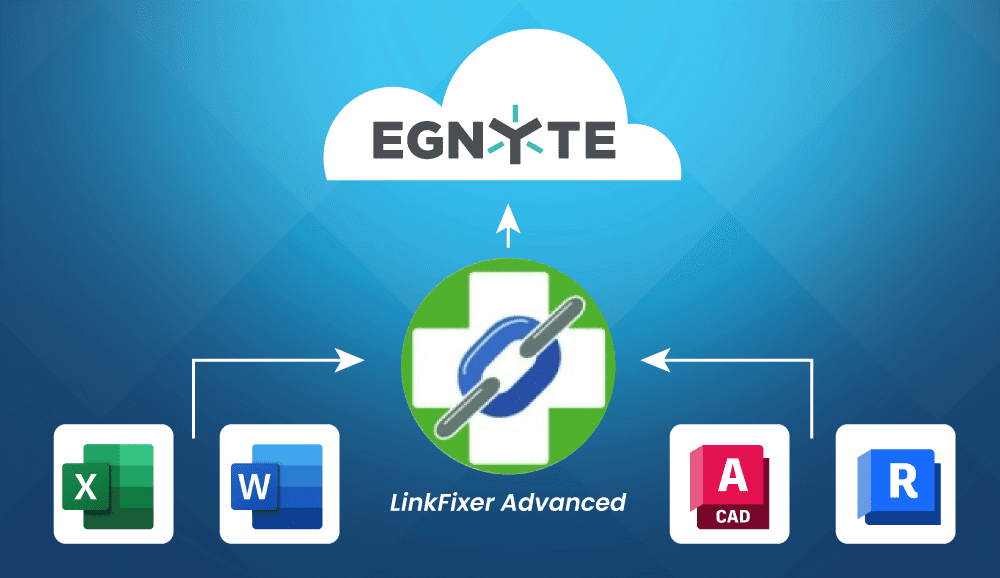
When you migrate large volumes of files to Egnyte, links in files such as Excel®, Word®, AutoCAD®, Revit® and more usually break. LinkFixer Advanced’s Inoculate & Cure feature ensures that links are protected pre-migration and automatically repaired after the migration, which results in uninterrupted access to files.
Post-Migration
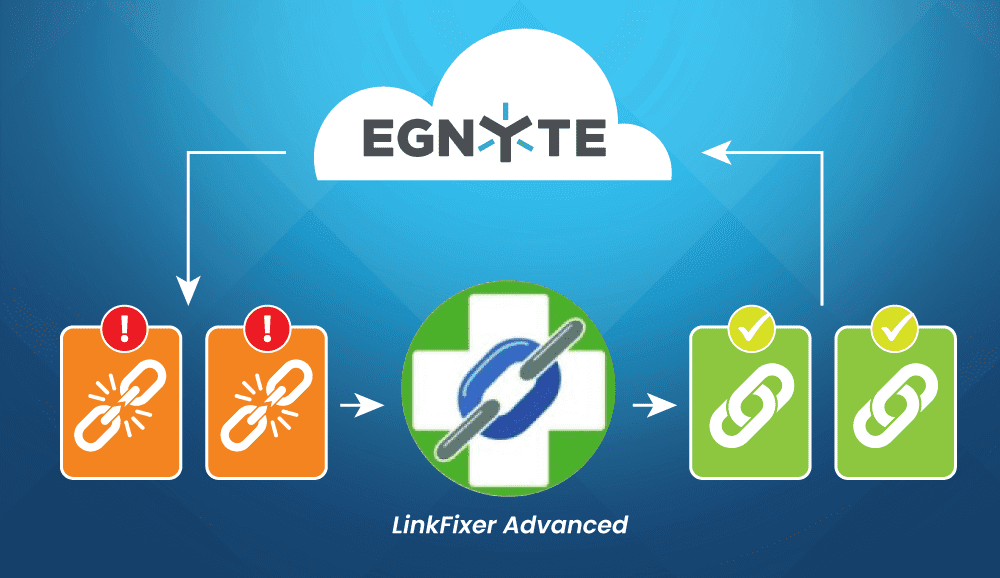
If you’ve already moved your files to Egnyte, reorganized folders, renamed files or moved items for better structure, you’re likely facing the inevitable data loss caused by broken links. LinkFixer Advanced's Modify Links feature can repair broken links in batch, instantly restoring that missing data.
No credit card required
Key Features and Benefits
Hover over each feature to see its benefit.
Protects Your Links Automatically
Speed Up File Processing
Comprehensive
Link Support
Optimized
for Teams
Automated API
Limit Handling
Flexible
Authentication Options
Seamless
Egnyte Navigation
Preserve
Version History
Protects Your Links Automatically
Speed Up File Processing
Comprehensive
Link Support
Optimized
for Teams
Automated API
Limit Handling
Flexible
Authentication Options
Seamless
Egnyte Navigation
Preserve
Version History
Success Stories

Thank you for helping me salvage several years worth of work! Without going into great detail, changes over time left me with files containing links that didn’t exist anymore. In addition, I had files with broken links due to company name changes. All in all, this created many broken links and, what I thought was, an impossible job of fixing them all. This morning I purchased LinkFixer. By noon, the links were working! I now feel like broken links are a thing of the past. Thanks again for your great product and for the awesome support you provide.
Gail Johnson - Programmer/Analyst
Grant County Public Utility District

I want to thank you and your techs for their help with our project. We were able to sift through over 600 GB’s of data with thousands of Microsoft Office files and fix links. Due to a server change that did not support spaces in root folder names, we had to remove spaces from 7 root folders on our Network Appliance filer. We were able to do this with little or no impact to our end users by changing links with the folder name in it to a UNC path. This allowed us to fix the links and then make the change to the folder name. I have spread the word in the Deere community that your product works great.
Michael Nowels - IT manager
John Deere

LinkFixer is a great piece of software. It is a utility that takes a basic idea and incorporates it into a powerful tool. You would think that what LinkFixer does would have already been a part of an Office Suite or operating system. However, that isn’t the case, so LinkFixer has answered the needs of many by simplifying the management of document links across a wide variety of different software applications. Good job!
Alex Moreno
Masterfoods USA

These are just a few of hundreds of testimonials that you might find useful.

1805 Drew Street
Clearwater, Florida 33765
Phone: 727-442-1822
E-mail: LinkMail@LinkTek.com
CONNECT WITH US
Copyright © 2014–2025 LinkTek Corporation and IntelliProp LLC. All Rights Reserved. LinkTek and LinkFixer Advanced are trademarks of IntelliProp. Microsoft is a registered trademark of Microsoft Corporation. Other trademarks are held by their respective owners. Not responsible for inadvertent errors. Privacy Policy.


 ChatGPT,
 Gemini,
 Claude and
 Copilot